1. What is Zoho CRM?
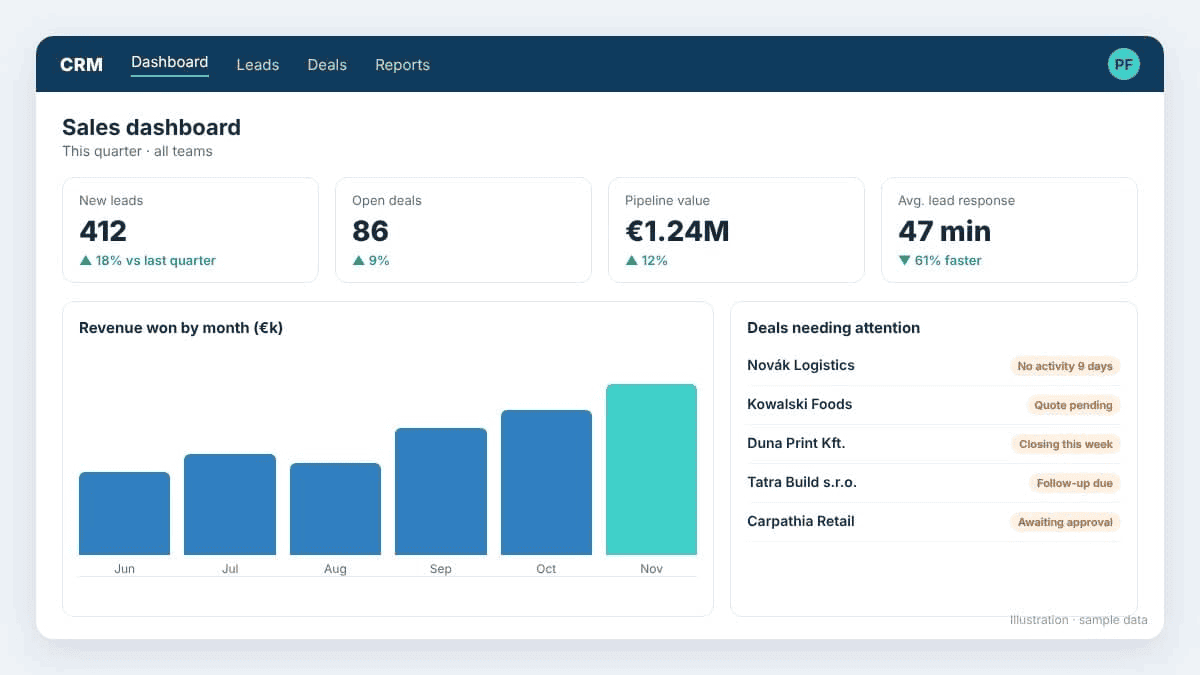
Zoho CRM is a cloud-based platform for managing leads, customers and sales activities. Think of it as one central place for all your customer information, where your team can:
Save contact details and record calls and meetings.
Track each customer's sales stage.
Set reminders for follow-ups.
It also connects with Zoho Campaigns, Zoho Desk, Zoho Books, Zoho Analytics and Zoho Forms, linking sales with marketing, finance and customer service. Learnmore about Zoho CRM solutions from PFC Group.
2. Key Zoho CRM features and benefits
Lead and deal management
When a potential customer fills out a form on your website, Zoho CRM captures their details automatically. Your team assigns the lead, tracks conversations and moves the deal through each sales stage.
Benefit: fewer missed leads and faster responses.
Workflow automation
Zoho CRM automates repetitive work. For example, a new lead can be assigned to a sales rep with a follow-up task created automatically. Blueprints guide employees through processes such as deal approvals.
Benefit: less manual work and a consistent sales process.
Customer communication
Emails, phone calls and live chat are saved on the customer record. With Zoho SalesIQ, you can also see what website visitors do before they contact you.
Benefit: your team knows the full customer history before every call.
Reports and dashboards
Dashboards show new leads, open deals, sales rep performance and expected revenue at a glance. For reporting across several apps, connect Zoho Analytics.
Benefit: clearer forecasts and faster decisions.
Customisation and integrations
Customise fields, modules and layouts, and redesign record pages with Canvas, Zoho's visual editor. Read more about Zoho CRM Canvas. Zoho CRM connects with Google Workspace, Microsoft 365, ERP and accounting software. Czech businesses can also use local integrations such as ARES, which fills in company details from the business register, and Leady.com, which shows which companies visit your website.
Benefit: a CRM that fits your process.
3. Which Zoho CRM edition is right for your business?
Other options: Bigin for simple pipeline management in small businesses, Zoho CRM Plus for sales, marketing and service in one suite, and Zoho One for running the whole business on Zoho. If you plan to digitise more departments later, Zoho One is often more cost-effective than buying separate apps.
|
4. Zia AI and Zia Agents: How is AI changing Zoho CRM?
Zia is Zoho's built-in AI assistant. It predicts which deals are likely to close, suggests the best time to contact a lead, and answers plain-language questions such as "Which deals have had no activity this month?"
The biggest change in 2026 is Zia Agents. Instead of only giving suggestions, agents take action inside the CRM:
Lead qualification: review new leads and identify suitable prospects.
Sales coaching: give sales reps feedback and suggestions.
Quote creation: prepare quotes from deal information.
Follow-ups: flag deals that need another customer interaction.
Agents are built with a no-code tool, and admins decide what each one may do. They are available from the Professional edition upwards. AI works best on clean data and clear processes, so we recommend adding agents once your CRM setup is stable.
5. How much does Zoho CRM cost in 2026?
| |||||||||||||||||||||||||
6. How to implement Zoho CRM in four steps
Understand your business. Map how your team manages leads and sales today, and set 2–3 measurable goals, such as "contact every new lead within one hour".
Set up the CRM and move your data. Configure users, permissions and pipelines. Clean your data before importing it, and set up EU data hosting and GDPR consent fields.
Connect and automate. Link email, accounting and marketing tools, then automate lead assignment, reminders and approvals. Test before launch.
Train your team and improve. Train employees in their own language, review usage regularly, and add automation and AI step by step.
How long does it take? A small team can usually go live in 2–4 weeks. Mid-size companies with data migration and integrations typically need 6–12 weeks.
Tip: start simple. The goal is not to use every feature, but to make everyday work easier.
7. Why choose PFC Group as your Zoho Partner?
PFC Group is a Zoho Premium Partner delivering IT consulting and training since 1997.
Local teams: offices in the Czech Republic, Slovakia, Poland, Hungary, Romania and India.
Your language: implementation and training in Czech, Slovak, Polish, Hungarian, Romanian, English and more.
End-to-end service: consulting, setup, data migration, integrations, custom development and support.
Local add-ons: ready-made integrations such as ARES and Leady.com.
Frequently asked questions about Zoho CRM
What is Zoho CRM used for?
Zoho CRM helps businesses manage leads, customers and deals in one place. Teams use it to automate follow-ups, track the sales pipeline and forecast revenue.
What is the difference between Bigin and Zoho CRM?
Bigin is a simple pipeline CRM for very small teams. Zoho CRM is the full platform, with advanced automation, AI and customisation. Many businesses start with Bigin and upgrade later.
What are Zia Agents?
Zia Agents are AI agents in Zoho CRM that take action, such as qualifying leads, preparing quotes and suggesting follow-ups. You control what each agent is allowed to do.
Do I need a Zoho Partner?
Not for a basic setup. A partner helps with data migration, integrations, automation and training, so your team adopts the CRM faster and with fewer mistakes.
Ready to improve your sales process?
Not sure which Zoho CRM solution fits your business?
Talk to PFC Group's Zoho experts about your requirements and the right implementation approach.
Book a Free Zoho CRM Consultation ·
Explore Zoho CRM
PFC Group | Zoho Premium Partner. Your partner for Zoho consulting and business automation